Close Menu

    Subscribe to Updates

    Get the latest Tesla news and insights directly to your inbox.

    What's Hot

    How to Turn On Tesla Santa Mode (Christmas Mode)

    December 4, 2025

    What to Check When Buying a Used Tesla

    November 26, 2025

    Can You Charge Your Tesla in the Rain?

    November 23, 2025
    Facebook X (Twitter) Instagram
    Tesla Fox
    Subscribe
    • Home
    • Models
      1. Model S
      2. Model 3
      3. Model X
      4. Model Y
      5. Cybertruck
      6. View All

      Tesla Reintroduces Free Lifetime Supercharging for Model S

      December 15, 2024

      Replace 2017 Tesla Model S Fuse Warning

      December 12, 2024

      Tesla Model S Real Wood Interior

      December 12, 2024

      What do Tesla Tire Markings Mean?

      December 11, 2024

      How Much is the Cheapest Tesla Car?

      November 21, 2025

      How Much Does Ceramic Coating Cost for a Tesla Model 3?

      January 18, 2025

      What do Tesla Tire Markings Mean?

      December 11, 2024

      Tesla Model S Wheels and Rims

      December 11, 2024

      Tesla Model X Plaid Seats vs Normal (LR)

      December 12, 2024

      GMC Yukon Dimensions vs. Tesla Model X

      December 12, 2024

      What do Tesla Tire Markings Mean?

      December 11, 2024

      What is Faster: Tesla Model X or Tesla Model S?

      December 11, 2024

      What do Tesla Tire Markings Mean?

      December 11, 2024

      How Much Does It Cost to Wrap a Tesla Model Y?

      December 2, 2024

      How Often Should You Change Brake Pads in a Tesla Model Y?

      November 30, 2024

      Does the 2021 Tesla Model Y Have an LFP Battery?

      November 29, 2024

      Tesla Cybertruck Now Eligible for $7,500 Federal Tax Credit

      January 2, 2025

      What do Tesla Tire Markings Mean?

      December 11, 2024

      Lil Baby’s Glossy Red Tesla Cybertruck

      November 26, 2024

      2 Chainz’s Bold Tesla Cybertruck Modifications

      November 24, 2024

      How to Turn On Tesla Santa Mode (Christmas Mode)

      December 4, 2025

      What to Check When Buying a Used Tesla

      November 26, 2025

      Can You Charge Your Tesla in the Rain?

      November 23, 2025

      How Much is the Cheapest Tesla Car?

      November 21, 2025
    • Categories
      • News
      • Guides
      • Reviews
      • Spotted
      • Tips
    • Contact
    Tesla Fox
    • Home
    • Models
    • Guides
    • Tips
    • Spotted
    Home»Guides»How to Turn On Tesla Santa Mode (Christmas Mode)
    Guides

    How to Turn On Tesla Santa Mode (Christmas Mode)

    December 4, 2025Updated:December 4, 2025No Comments3 Mins Read
    Facebook Twitter Pinterest LinkedIn Tumblr WhatsApp VKontakte Email
    Tesla Santa Mode
    Image from video by Sara Helme
    Share
    Facebook Twitter LinkedIn Pinterest Email

    Tesla is known for adding fun and unexpected Easter eggs to its vehicles. One of the most popular is Santa Mode, a holiday-themed feature that brings Christmas animations, sounds, and a festive navigation look to your Tesla. If you’re wondering what Santa Mode is, how it works, or how to activate Tesla’s full Christmas experience, this guide covers everything step by step.

    Table of Contents

    • What Is Tesla Santa Mode?
    • How to Turn On Tesla Santa Mode
      • 1. Activate Santa Mode With a Voice Command
      • 2. Activate Santa Mode Through the Toybox Menu
    • How to Turn Off Santa Mode
    • How to Put Your Tesla Into Full Christmas Mode
      • Tesla Christmas Light Show (Holiday Show)
      • Santa-Themed Navigation Display
    • Which Tesla Models Support Santa Mode?
    • Why you will enjoy Santa Mode

    What Is Tesla Santa Mode?

    Tesla Santa Mode, often called Christmas Mode or the Holiday Easter Egg, is a festive visual and audio theme that appears on your Tesla display when activated. When enabled:

    • The Tesla vehicle icon on your navigation screen transforms into Santa’s sleigh
    • Other nearby cars appear as reindeer
    • Turn signals can play sleigh bell sounds
    • The interface gains a Christmas-style theme

    Santa Mode does not affect how the vehicle drives. It is purely for entertainment and holiday atmosphere.

    Santa Mode first appeared in Tesla’s 2016 holiday software update and remains a fan favorite every December.

    How to Turn On Tesla Santa Mode

    You can activate Santa Mode in two simple ways.

    1. Activate Santa Mode With a Voice Command

    Use your Tesla’s built-in voice control and say:

    “Ho Ho Ho.”

    To trigger the version with additional audio and music, say:

    “Ho Ho Ho Not Funny.”

    Your Tesla will instantly switch into Santa Mode.

    2. Activate Santa Mode Through the Toybox Menu

    If you prefer enabling it manually:

    1. Tap the Toybox icon (sometimes labeled Easter Eggs) on your Tesla screen.
    2. Scroll to find Santa Mode.
    3. Tap Santa Mode to activate the visuals and sounds.

    Your navigation map and driving visualizations will immediately change into Christmas style.

    How to Turn Off Santa Mode

    To exit Santa Mode, simply:

    • Tap the Santa Mode icon again in the Toybox
    • Or use the voice command: “Turn off Santa Mode.”

    Your Tesla will return to its regular interface and sounds.

    How to Put Your Tesla Into Full Christmas Mode

    Santa Mode is just one part of Tesla’s holiday features. Here are the other Christmas options you can activate.

    Tesla Christmas Light Show (Holiday Show)

    This feature is available on most Tesla models, including Model 3, Model Y, Model S, and Model X.

    To start the light show:

    1. Open Toybox.
    2. Select Light Show.
    3. Park the car, exit, and watch your Tesla perform a synchronized music and light performance.

    This includes headlights, taillights, mirrors, windows, and even doors on certain models.

    Santa-Themed Navigation Display

    Some Tesla software versions automatically apply a winter-style navigation theme after Santa Mode is turned on. If not, you can manually adjust certain features:

    1. Open Toybox.
    2. Select Santa Mode.
    3. Make sure the setting for turn signal bells is enabled.
    4. Begin driving to see the festive visualizations.
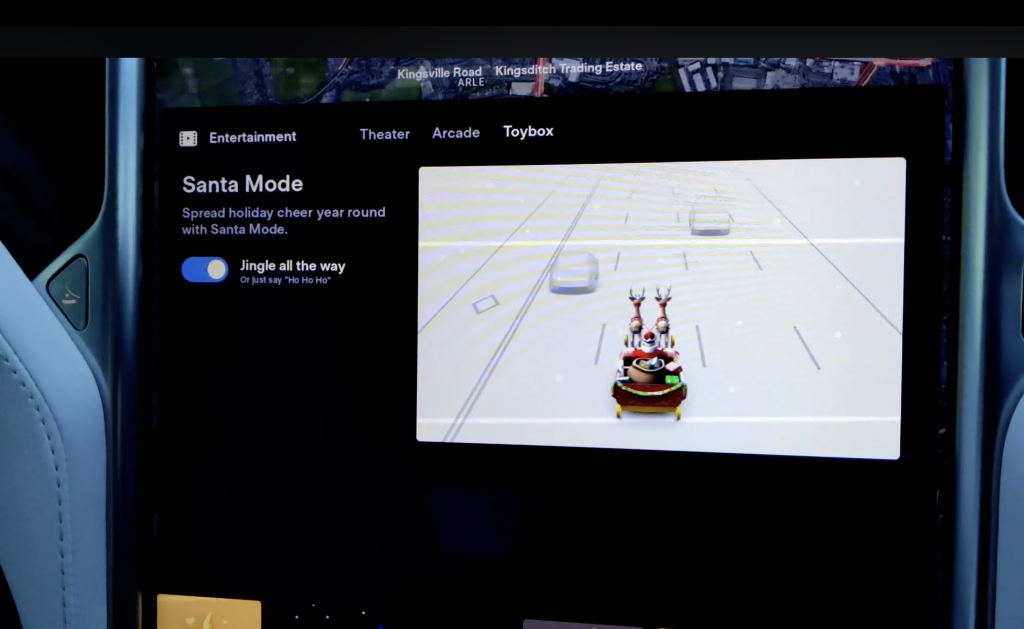
    Christmas mode navigation theme (Screenshot from video by Sara Helme)

    Which Tesla Models Support Santa Mode?

    Santa Mode is supported on all newer Tesla models, including:

    • Model S
    • Model 3
    • Model X
    • Model Y

    Older Teslas with early MCU1 hardware may have limited features, but most still support the basics. If you don’t see Santa Mode, be sure your software is updated.

    To update:

    Controls → Software → Check for Update

    Why you will enjoy Santa Mode

    Santa Mode adds a fun seasonal twist to the driving experience. It is a hit among families, passengers, and anyone who enjoys Tesla’s playful personality. It has become a holiday tradition for many Tesla drivers and a popular way to show off Tesla’s unique software capabilities.

    Share. Facebook Twitter Pinterest LinkedIn Tumblr WhatsApp Email
    Previous ArticleWhat to Check When Buying a Used Tesla
    Marc Kelton
    • Website

    Marc is a tech nerd who loves Tesla, fast charging, and anything that moves on electrons. He writes simple, honest takes on the EV world. Marc drives a Model Y.

    Related Posts

    What to Check When Buying a Used Tesla

    November 26, 2025

    How to View Sentry Mode Events on Phone

    January 18, 2025

    Tesla Model X Plaid Seats vs Normal (LR)

    December 12, 2024

    GMC Yukon Dimensions vs. Tesla Model X

    December 12, 2024
    Leave A Reply Cancel Reply

    Our Picks

    5 Best Tesla Model 3 Screen Protectors Review [2025]

    October 24, 2024

    Can Tesla Mileage Be Altered and Reversed?

    October 13, 2024
    Don't Miss
    Guides

    How to Turn On Tesla Santa Mode (Christmas Mode)

    December 4, 20250

    Tesla is known for adding fun and unexpected Easter eggs to its vehicles. One of…

    What to Check When Buying a Used Tesla

    November 26, 2025

    Can You Charge Your Tesla in the Rain?

    November 23, 2025

    How Much is the Cheapest Tesla Car?

    November 21, 2025

    Subscribe to Updates

    Get the latest Tesla news and insights directly to your inbox.

    About Us
    About Us

    Tesla Fox is your ultimate hub for Tesla news, spotted updates, reviews, guides, and tips. Dive into EV insights, innovations, and expert advice, all tailored for Tesla enthusiasts!

    Our Picks

    5 Best Tesla Model 3 Screen Protectors Review [2025]

    October 24, 2024

    Can Tesla Mileage Be Altered and Reversed?

    October 13, 2024
    New Comments
    • Marc Kelton on How Many Cybertrucks Have Been Delivered? (Updated: December 2025)
    • Kreditni Kalkulator on Can Tesla Range Expand and Increase Overnight?
    • infiniti-salon.com on How Many Cybertrucks Have Been Delivered? (Updated: December 2025)
    • Kreditni Kalkulator on Kim Kardashian in a Tesla Cybertruck
    Tesla Fox is an independent website dedicated to providing news and information about Tesla. We are not affiliated with Tesla, Inc. or any of its subsidiaries. All content is for informational purposes only and is not endorsed or sponsored by Tesla, Inc.

    Some of the links on Tesla Fox are affiliate links. This means we may earn a small commission if you make a purchase through these links, at no extra cost to you. We only recommend products and services we truly believe in.
    Privacy Policy - About Us
    © 2025 Tesla Fox. Developed by Wentil Studio. A part of S3 Media.

    Type above and press Enter to search. Press Esc to cancel.